
Quick background: These articles were originally written for Sandra Holze’s company blog (which no longer exists, hence no link). But since I got carried away with writing, they turned out a bit longer than intended. So Sandra published a condensed version of these 3 articles, and here I’m now publishing the much more detailed versions.
Not too long ago, the phrase “Is there an app for that?” made its way into our everyday lives in connection with smartphones. No matter what new trick your phone needs to learn – maybe it should tell you the name of the song playing in the background at a restaurant, or you want to order an Uber to the airport -, the odds are extremely good that an app will get the functionality you want onto your smartphone in no time.
And yet the principle isn’t nearly as new as it may seem to some readers. Because essentially, plugins for WordPress do exactly the same thing, and they’ve been around since May 22, 2004 – more than 3 years before the first iPhone was released.
Plugins are one of THE key arguments for WordPress. Sure, the “Content Management System” also lets you edit your content yourself, so that the costs for your web designer / developer (hopefully) stay within limits after the site first goes live. (In German, by the way, the term “Content Management System” could simply be translated as “a system for managing content”, but these days there’s always a much catchier English term for such boring descriptions, so let’s just stick with “CMS”.) But lots of other similar systems can claim that, too.
Plugins (and themes) are the reason why WordPress is the most popular CMS in the world…
… and why more than a quarter of all known websites run on it (as of February 2016; source)! Want to give visitors to your website the option to book an appointment with you? A plugin takes care of that for you. Want to let people leave comments with their Facebook accounts? Again, a plugin has you covered.
Before I paint far too rosy a picture here, let me say this: Plugins can be not only a blessing but, to be honest, a curse as well. That’s why in today’s article I’d like to spread a bit more background knowledge before we break down my personal top 10 list of the most recommended extensions for WordPress in parts 2 and 3.
Key principles when it comes to plugins
1 With plugins, less is more!
THE golden rule, which beats EVERY other principle in any discussion about WordPress plugins, is: “Less is more.”
I build websites professionally, and my record for the number of installed plugins over the past two years is 12. But that’s also a website that embeds a Twitter as well as a Facebook feed, sends individual emails when people perform certain actions, illustrates statistics in posts with charts, and pulls off quite a few other stunts. So if your website covers far less functionality but you still have 15 or more plugins in use, then in most cases something is wrong.
To be honest, though, I also started out smaller, and my old company homepage also had more plugins running than I’d have liked; so it’s more or less “normal” to try out a lot of things while you’re getting to know WordPress (and very often to forget to clean house properly later on; a comparison to teenage romances is on the tip of my tongue, but I’d better bite it).
But why is less more? To answer that, it’s important to understand how plugins work (at least roughly). Every plugin includes at least one .php file that’s loaded by the server to extend WordPress’s functionality. In many cases, there’s also a bit of JavaScript to enable some kind of interactivity (e.g. displaying a notice that the email address has been added to the newsletter list after a user clicked the “Submit” button), and quite often a stylesheet as well to control the look of the plugin elements. Ideally, these are all just small files, but they still all have to be loaded from the server first whenever someone visits the site. If you take a closer look at the topic of website speed and run a few speed tests, e.g. with the help of the Google Developer Tools, you’ll notice very quickly when comparing a few WordPress websites that a very typical problem is the high number of JavaScript and CSS files. And that’s often a sign of “too many” plugins.
What feels like 60% of all WordPress sites use too many plugins!
So it won’t surprise you that after a first look, my number 1 optimization tip for WordPress site owners almost always is: Reduce the number of your plugins.
2 EVERY WordPress plugin is a potential security hole!
As I said, every plugin consists of at least one .php file. And if the plugin author doesn’t know exactly what he’s doing (and sometimes even when he knows pretty well what he’s doing), then this file opens a little door into your website. It’s very hard to illustrate this issue with purely theoretical explanations, so let me get specific and give you an example:
A few years ago, timthumb.php was an extremely popular script for shrinking images. If you had uploaded a 1200 x 600 pixel image to the media library, a call like “http://deinewebseitenurl.de/timthumb.php?id=bildadresse&w=400&h=400″ let you serve the image at 400 x 400 pixels. With no further effort! Sounds cool at first and makes the life of a WordPress theme designer a whole lot easier – who wants to write something like that by hand?
Now, this timthumb script had more or less “grown over time”. That means it originally had a similar, but not quite identical, job. If I remember correctly, that job had to do with blogger sites, because people there were also constantly uploading images. And so the timthumb script accepted almost any file passed to it that sat on a URL starting with “http://blogger.com”. ALL files. Including non-images, so e.g. virus.php as well.
So if someone knew you were using timthumb, all they had to do was enter “http://deinewebseitenurl.de/timthumb.php?id=http://blogger.com/meincoolervirus.php” in their own browser, and YOUR server would load their virus.
This may sound a bit unbelievable (it’s also slightly simplified), and one or two readers will probably smack their foreheads while reading this and wonder how a security hole like that could go unnoticed, but some developers simply underestimate the criminal potential of computer hackers. Or the developer originally just wanted to write a small script for himself, which then – to his own surprise – quickly gained popularity and suddenly spread across the entire web. In that case, you may well forget to put the script through its paces – after all, you don’t assume the rest of the world will copy it if it isn’t secure…
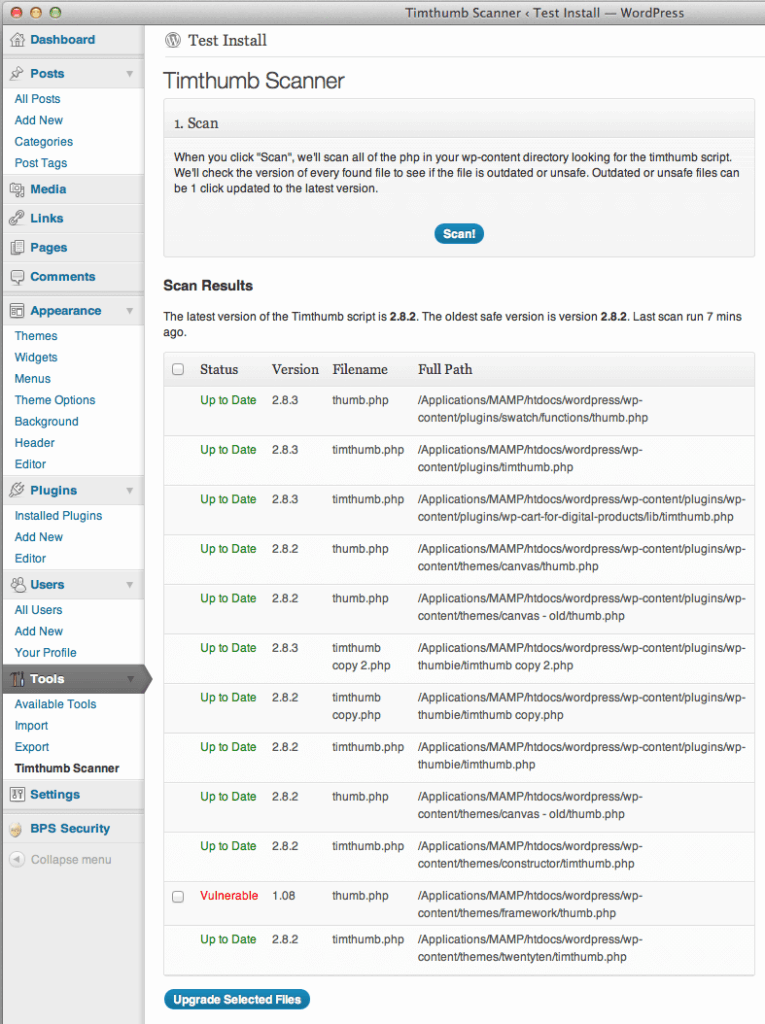
A quick clarification: This story is 90% accurate; hackers had to take one small additional step, but I don’t really want to explain here how to take websites down (which, to be honest, isn’t my area of expertise either). However, if you use timthumb on your site (the script is still popular), make sure you update it to the latest version, which can be downloaded for free here: timthumb on Google Code. That alone reduces the risk of your site being hacked many times over. It’s no coincidence, though, that when you google “timthumb”, at least 3 results on page 1 talk about a “vulnerability” or a “security risk”.
3 Only up-to-date plugins are GOOD plugins
It’s almost inevitable that sooner or later a security hole will creep into WordPress plugins – especially popular ones. So you shouldn’t automatically lose all trust in a plugin developer if it comes out that one of their extensions made it possible to hack a website. What matters, though, is that this security hole gets fixed and that you, in turn, always keep your plugins nicely up to date so your blog isn’t affected.
The leak of the “Panama Papers”, which has dominated the headlines in recent weeks and has already cost at least one prime minister his job, was made possible in part by an outdated version of the Revolution Slider plugin, according to the highly recommended WordFence Blog. Now, I’m not a fan of the Revolution Slider (or any slider…), but I’m pretty much alone with that opinion – it’s one of the most popular slider plugins out there.
Once again:
If Mossack Fonseca, one of the biggest offshore firms in the world, had put a trained monkey in front of a computer to click “Update” in the WordPress backend once a week, Iceland would still have the same prime minister as a month ago. Sounds funny, but it’s true.
4 Ideally, install ONLY well-maintained and proven plugins
If a plugin was last updated by its developer 3 years ago, then frankly that doesn’t exactly speak in its favor. Good plugins are usually updated regularly, for example to make sure they always work perfectly with the latest WordPress version. At the same time, frequent plugin updates signal that the developer responds to user feedback and therefore also fixes potential security holes very quickly.
Another useful indicator of good plugins is, logically, their ratings. These days, when you install plugins, WordPress tries a bit harder to show recommendations that have more ratings and have been installed frequently (that used to be different, and you often had to dig through many pages to find even one usable plugin), so you can’t go too wrong in that respect anymore, but I still want to stress it.
To be honest, there are exceptions in rare individual cases – for a special use case, I once needed a plugin that dynamically replaces regular expressions in a blog, and the best plugin for it now has 1 rating (mine) and was last updated 6 years ago, but it really was the only plugin that met all the requirements we had for it (whenever I wonder how nerdy I am, I always think back to this particular case…) -, but you should test those even more thoroughly. It’s understandable that the developer has little interest in further developing something that only a few people use, and maybe the plugin does exactly what it’s supposed to do in its original form and no changes are needed at all, but as I said, that’s more the exception and only applies to a handful of use cases.

I hope this has given you some good pointers that can help you make the right decision when it comes to installing a new WordPress plugin.
In part 2 of this mini-series, I’ll start going through my top 10 most important plugins. Until then, feel free to share your best plugin stories with the rest of the readers, even if they may not quite measure up to the Mossack Fonseca story.


Leave a Reply