

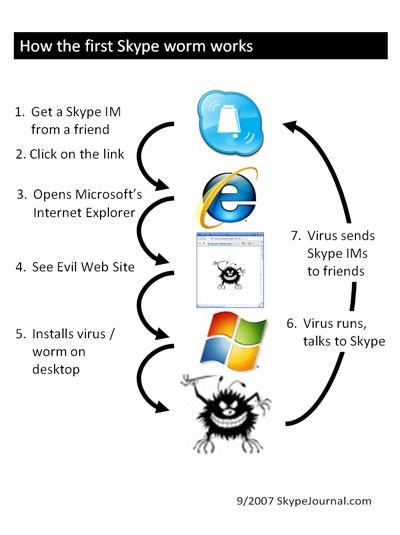
A Skype worm is currently making the rounds, and according to recent reports it’s spreading rapidly. How it works is explained in an easy-to-understand way by a very clear graphic originally published by Skype Journal:
First, you receive a message from one of your own Skype contacts that reads either
lol” is this your new profile pic? http://goo.gl/[REDACTED]?img=[USERNAME]”
or
“hey, can’t believe what great photos of you are on your profile h__p://goo.gl/{BLOCKED}5q1sx?img=username”
or some variation of these. If you click the link, the worm installs itself on your computer as well: first, a .zip file is downloaded (named either “skype_06102012_image.zip” or “skype_08102012_image.zip”), which in turn contains executable files that carry traces of the signatures of the worms “Troj/Agent-YCW” or “Troj/Agent-YDC” (names used by Sophos’ anti-virus products).
After that, you yourself send the message to your Skype contacts, and the worm keeps spreading.
Several blogs see the biggest danger in Skype users being unprepared. While many users of Facebook, Twitter and other Web 2.0 platforms have learned by now that you shouldn’t blindly click every link, this is something entirely new for most Skype users.
Further Consequences of an Infection
Once the Trojan has successfully installed itself, it allows a hacker to take control of the infected PC and to communicate with the hacker via HTTP. One result can be messages sent to your computer claiming that your files have been encrypted and will be deleted unless you pay $200 within the next 48 hours. Don’t believe these threats—your files are normally still safe; you should just make sure to get rid of the worm as quickly as possible.
Countermeasures
Most anti-virus software vendors have adjusted to the new threat by now and updated their databases. So it’s a good idea to bring your anti-virus program (e.g., AntiVir) up to date and then run a full scan of your system.
If your anti-virus program doesn’t report anything, but you know for sure that you clicked a link like this, there’s also a manual way to get rid of the worm:
- Restart your PC in Safe Mode (usually F8 during startup)
- Open the Registry Editor (Windows + R to open a command line; type “regedit” and press Enter)
- Now go to HKLM/software/microsoft/windows/currentversion/runonce, where you should find an entry called mshtmldat32.exe. Delete this entry!
- Now navigate to the WindowsSystem32 directory in the regular Explorer and delete the following files there:
- wndrivs32.exe
- mshtmldat32.exe
- winlgcvers.exe
- sdrivew32.exe
- Select the windows/system32/drivers/etc directory.
- Find the file “hosts” there
- Open the file with a text editor (e.g., the preinstalled Notepad), select everything (Ctrl + A) and delete all entries (this step makes sure your anti-virus software can update itself again). Save and close.
- Restart your PC (normal mode)
More Information on the Topic
- The virus already spread via Facebook and Twitter last year and is even still lying dormant on some systems. It can even be spread via USB sticks and various instant messenger protocols (e.g., ICQ).
- Mac users basically don’t need to worry, since the worm can’t do any damage on their system (I tried it myself, since I’m in the middle of switching. If you’re interested in that topic, you’ll find more information on my personal blog). Regardless, it’s still a good idea for these users not to click every link that supposedly comes from good friends via Facebook, Twitter or a messenger like Skype.
- Some Microsoft critics put the blame on the corporation, which bought Skype last year. What Microsoft’s influence has to do with a security hole in Skype—one that other messengers in particular have already had to deal with as well—is beyond me, though.
Sources:
- GMA Network – Skype worm spreading via ‘lol profile pic’ messages
- TG Daily – Skype Users targeted by ransomeware Worm
- How Works Skype Worm And How To Remove It
- Skype Journal – How the Skype Worm works
- Countermeasures.Trendmicro.eu – Skype worm spreading fast
- ghacks.net – Quick Way to Remove the Skype Worm
- Skype Blog – On the worm that affects Skype for Windows users
Of course, we’d appreciate it if you passed our article on to friends and acquaintances who might be at risk. To stay informed about similar security risks and possible countermeasures in the future, we recommend following us on Twitter or Facebook, or subscribing to our RSS feed.



Leave a Reply